Made in USA · In stock, ships worldwide · Plug-n-play in under 1 minute
SETUP GUIDES

Set it up yourself. Detecting in under 1 minute from power-on.

Stand it up, run one cable and open the software. No installer, no calibration flights and no integrator. These guides cover a single unit, a fixed site and a multi-unit network.

Everything you need is in the box, plus three things you supply

Lay the kit out and check it against this list before you start. If anything is missing, call us first.

In the box

  • DroneTrack RF sensor unit with six-element direction-finding array, in your chosen finish
  • Tripod mount with adjustable mast
  • Armored Cat6 cable, carries power and data. Length: [CABLE LENGTH]
  • PoE injector and 110 to 220 V power supply
  • Software platform with desktop and mobile apps, no separate licence

You supply

  • A 110 to 220 V power outlet, or a 12V DC supply, within cable reach. Longest cable run: [MAX CABLE RUN]
  • A computer or phone for the software. [SOFTWARE REQUIREMENTS]
  • An open spot with a clear line of sight around it. [MOUNTING HEIGHT]

Every setup starts with the same six steps

Do the quick start first. Then follow the extra steps for your setup.

Portable or event

Stand it on the tripod for an event or a temporary site, and take it with you after.

Fixed site

Leave it in place to watch one site all year.

Several units

Network two or more units to locate the drone and the pilot.

Quick start: from box to detecting in six steps

Follow these steps with the unit in front of you. Each step ends with what you should see, so you know it worked before you move on.
1

Unpack and check the kit

Open the box. Lay out the unit, the tripod, the armored Cat6 cable, the PoE injector and the power supply.
You should see: Everything on the list above. If something is missing, call +1 (229) 597-8411 before you go on.
2

Stand it up

Extend the tripod and raise the adjustable mast. Fit the unit on the mast. [MOUNTING]
Place it in an open spot with a clear line of sight all around. [MOUNTING HEIGHT]
You should see: The unit standing steady, with nothing close by blocking its view.
3

Run one cable

Connect the armored Cat6 cable to the unit. This one cable carries power and data. [CONNECTORS]
You should see: A single cable from the unit back to your power point. [MAX CABLE RUN]
4

Power on

Plug the power supply into a 110 to 220 V outlet, or connect 12V DC.
You should see: [STATUS INDICATOR]. The unit starts monitoring on its own. There are no calibration flights to run.
5

Open the software

Install the DroneTrack app on your computer or phone. [SOFTWARE DOWNLOAD]
Connect the app to the unit. [FIRST CONNECTION]
You should see: The live view, with the compass and the spectrum display.
6

Confirm it's detecting

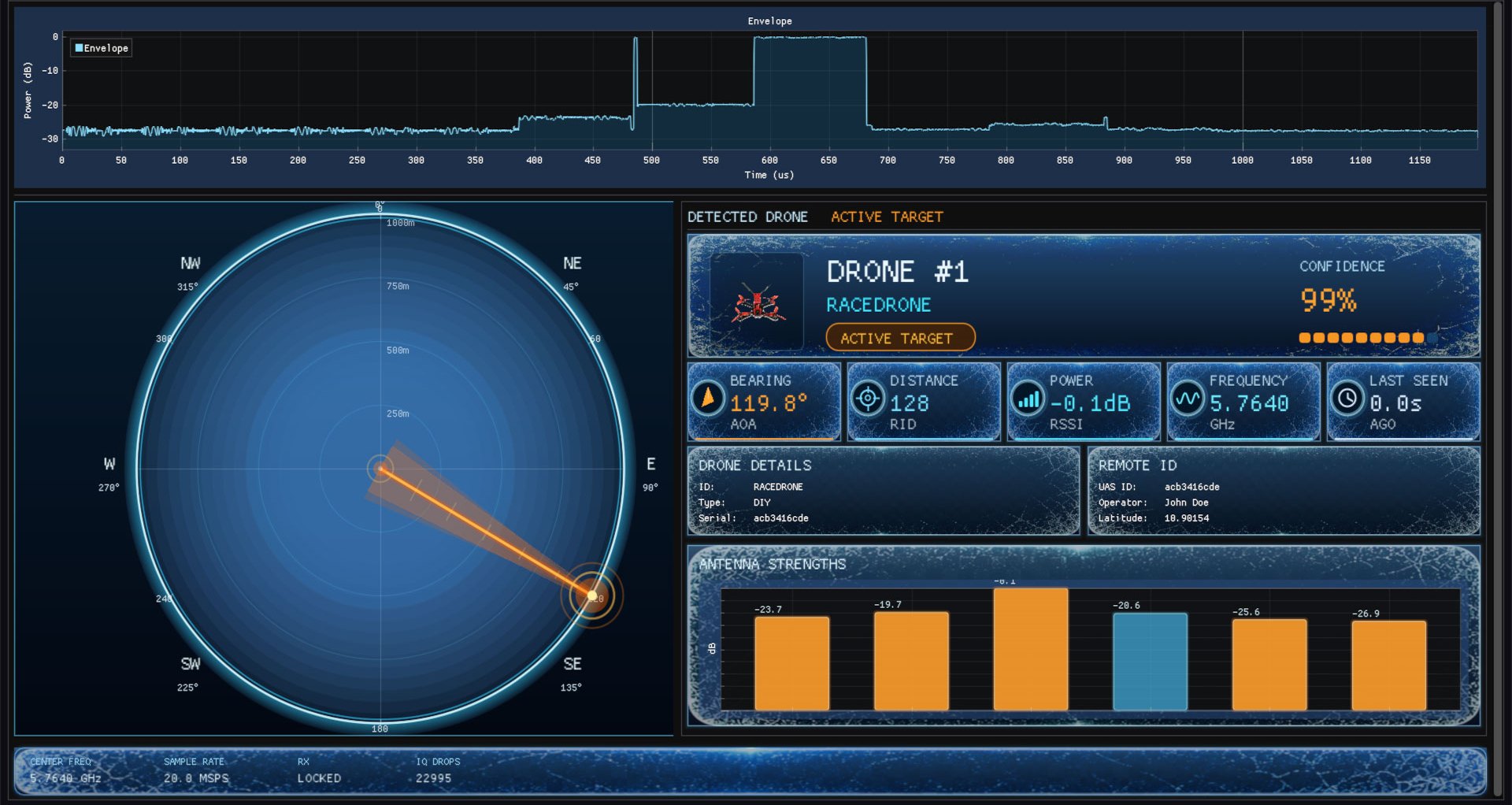
Keep the live view open. When a drone flies in range, it appears with its bearing on the compass, and the app sends a push alert.
You should see: A drone card with its bearing, confidence and any Remote ID details.
DroneTrack software dashboard showing a detected drone's bearing on a compass, 99% confidence, Remote ID and antenna strengths
The DroneTrack live view. Real screenshot.
Done. The unit is detecting, and it keeps detecting with no internet connection.
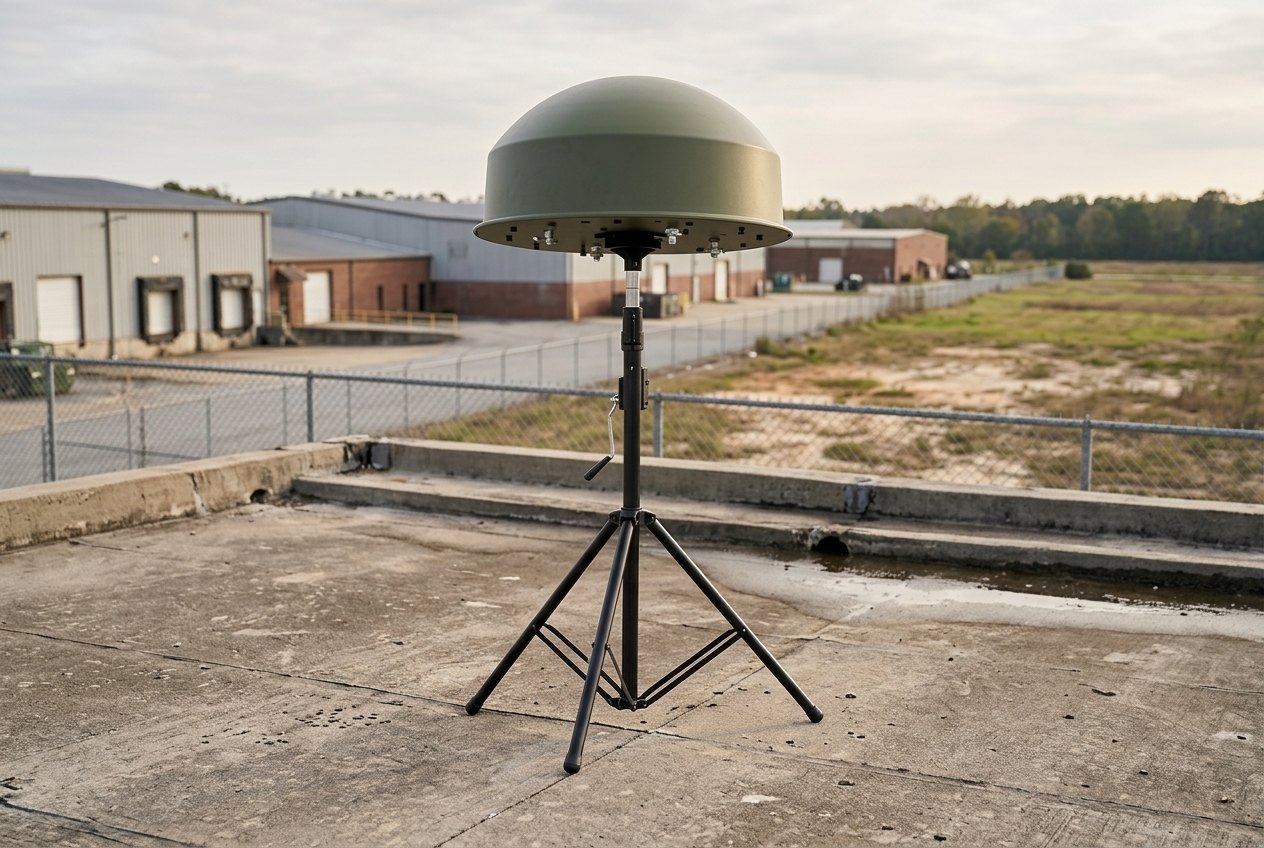
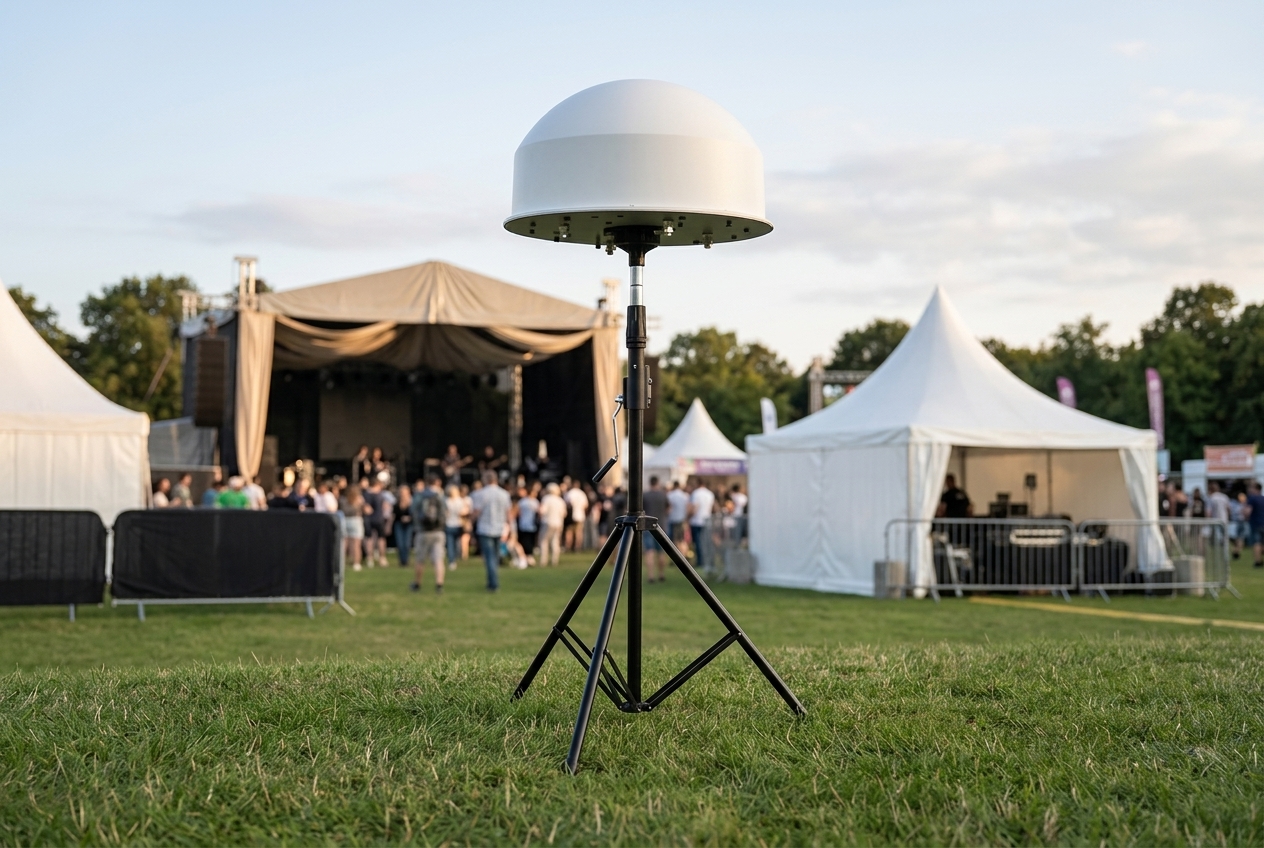
Illustration of the DroneTrack unit on its tripod at the edge of an outdoor event
Illustration

Portable setup: cover an event, then pack it away

The tripod and mast travel with the unit, so you can cover an event or a temporary site and take it with you after.
1
Pick a spot with a clear line of sight over the area you need to watch. [MOUNTING HEIGHT]
2
Do the quick start: tripod, one cable, power, software.
3
No mains power on site? Run it on 12V DC.
4
Keep the app open on a laptop or phone so your team gets push alerts.
Works at night and in fog and rain, from -40°C to +70°C. [WIND RATING] [WEIGHT]
Illustration of the DroneTrack unit on its tripod at a secure site
Illustration

Fixed site: mount it once and watch your site all year

Leave the unit running at one site. It works outdoors all year, at night and in fog and rain, from -40°C to +70°C.
1
Choose a mounting point with a clear line of sight in every direction. [MOUNTING HEIGHT]
2
Mount the unit, or leave it on its tripod. [MOUNTING]
3
Lay the armored Cat6 run from the unit back to where you will power it. [MAX CABLE RUN]
4
Power on and open the software, as in the quick start.
[IP RATING] [SOFTWARE UPDATES]
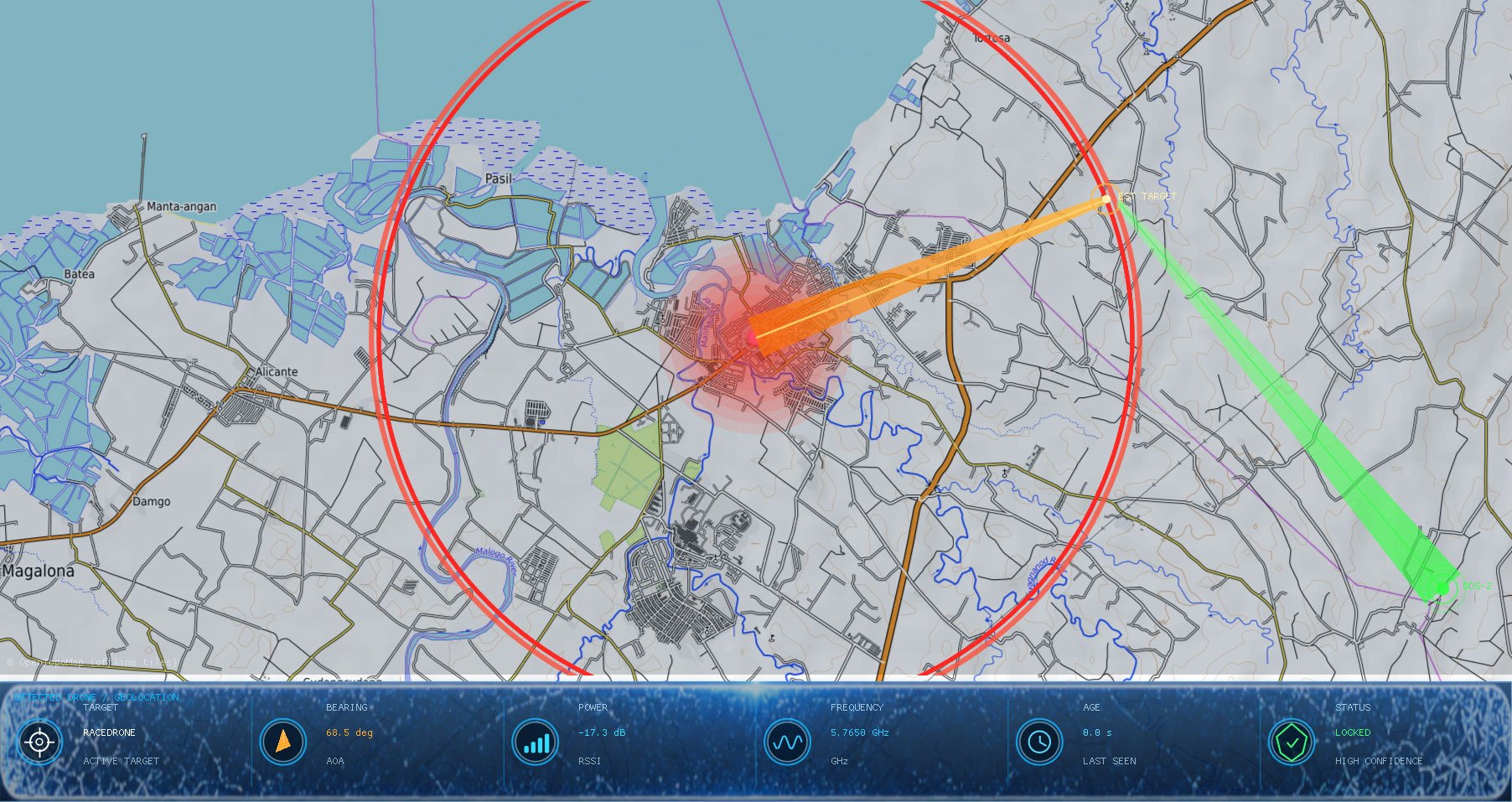
Geo-mapped live view with detection radius and bearings from two units meeting at the drone
Two units' bearings meeting at the drone. Real screenshot.

Several units: locate the drone and the pilot

One unit gives a live bearing. Two or more networked units cross their bearings, so the software shows where the drone and its pilot are.
1
Plan where each unit goes, so together they cover the site from several sides. [UNIT SPACING]
2
Set up each unit with the quick start. Every unit is a complete set, with its own tripod, cable and power supply.
3
Add each unit to the same software. [PAIRING]
4
Check that every unit shows on the map. A GNSS receiver in each unit keeps the network aligned.
You should see: Each unit's bearing on the map, and the drone's estimated position where the bearings cross.
Planning a larger site? Our engineers recommend how many units you need and where to put them. [SITE SURVEY]

Where you put the unit decides how much range you get

DroneTrack reaches up to 40 km against consumer drones and 80 km against military drones. On your site, terrain, line of sight and placement decide how much of that you get.
Give it a clear view. Hills, buildings and trees in the way reduce range.
Height: [MOUNTING HEIGHT]
No need to aim it. It covers 360°, and the bearing updates on its own as a drone moves.
Leave it out in any weather. It works at night and in fog and rain, from -40°C to +70°C.
Big site? Two or more units cover it from several sides and locate the pilot too. [UNIT SPACING]

Stuck on a step? Ask our engineers

We answer Mon–Fri, 8am–6pm ET, and reply within 1 business day.

Troubleshooting

[TROUBLESHOOTING]

Setup questions answered

Power, internet, weather and how many units.

DroneTrack spec sheet (PDF)

Power, cabling and mounting figures on two printable pages.

Using the software

Live map, spectrum analyzer, alerts and logs.

Stuck on a step or planning a larger site?

Our engineers help with setup and recommend a layout for bigger sites. Or buy a unit online today, in stock with free worldwide shipping.
DroneTrack home
Passive RF direction-finding and Remote ID drone detection, engineered and built in Columbus, Georgia 31909, USA. 500+ units deployed in 20+ countries.
Threat intelligence briefing

Monthly drone incident data, new signal signatures and regulation updates for security leaders.

Threat Intelligence Briefing

"*" indicates required fields

This field is for validation purposes and should be left unchanged.